
Website inventory: what customers see when stock runs out
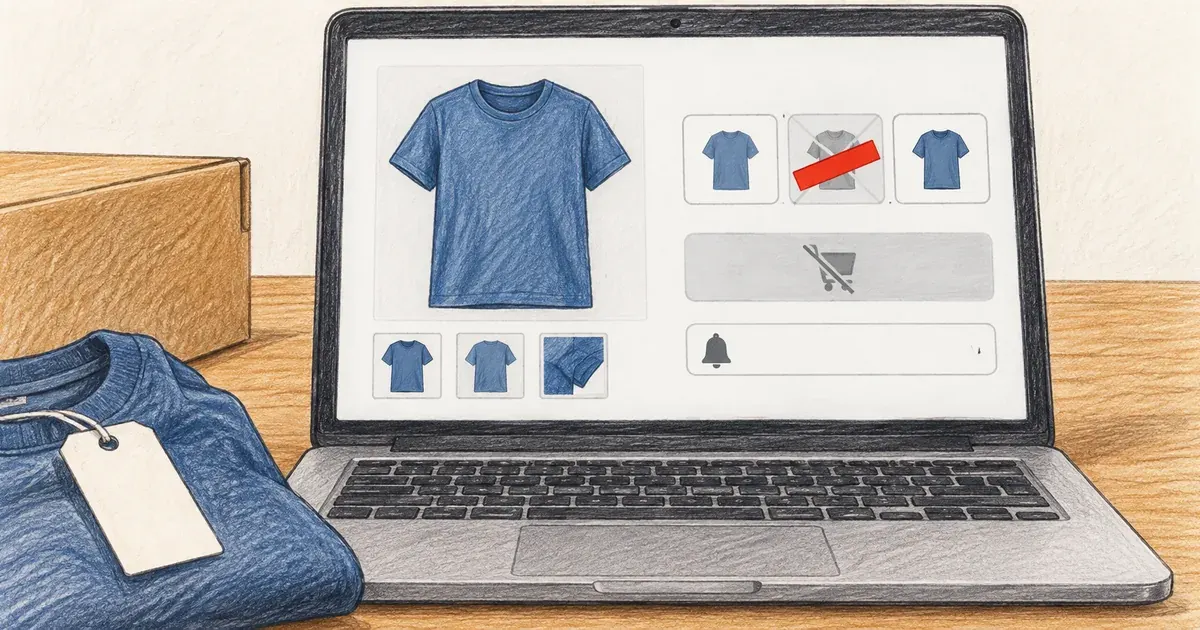
Photo: Avila Ops Tecnologia
When a product sells out, customers should still see its page, with “sold out” replacing the buy button and a “notify me when available” field. Sold-out variants (only size M, for example) remain visible but disabled, so shoppers can see size L is still available. Customers must never pay for something you do not have, and the page must not disappear along with its Google ranking.
Website inventory errors cost trust. Selling out-of-stock goods forces you to call, apologize, and refund. Hiding sold-out products makes customers think the store has shrunk. Unified inventory across website and counter solves both.
What should you show when stock runs out?

Photo: Avila Ops Tecnologia
Four decisions, in order of impact:
| Situation | What customers see | Why |
|---|---|---|
| Sold-out product that will return | Full page, “sold out,” “notify me when available” field | Keeps the page on Google and captures people wanting the product |
| Sold-out variant (one size or color) | Option crossed out or gray, not selectable | Customers see other options exist and do not waste time |
| Product that will not return | Page with a notice and similar products; after a while, redirect to the category | Makes use of visits without leaving a broken page |
| Last units | “2 left” when that number is real | Helps decisions; if invented, customers notice next time |
“Notify me” is the most valuable of the four. Every email or WhatsApp number left there is an interested prospect likely to buy when stock arrives, without advertising. Reply the same day you restock.
How do you prevent selling stock you do not have?
Three mechanisms, from simplest to most complete:
- Stock recorded by variant. Each SKU (each product’s internal code, explained in what is an SKU) holds the actual quantity. At zero, the store automatically blocks the button.
- Reserve at payment, not when added to cart. Reserving in carts lets ten undecided shoppers lock up product stock. Reserving at payment means whoever pays gets it. For Pix, a short-expiration QR code releases inventory if nobody pays.
- Unified inventory across website and counter. If you sell in person and online, the same quantity must decrease in both places instantly. A spreadsheet updated nightly does not work: between a 2 p.m. counter sale and an 8 p.m. update, the website has sold stock you did not have.
The third solves it for good. While website stock is a manually updated copy of real inventory, it falls behind with every sale. In a single system, sales from any channel deduct from the same count, and in-store pickup, discussed in in-store pickup: shipping that costs zero, becomes safe.
Low stock: when should you restock and send alerts?
Two rules a small store can maintain:
- A reorder point per product: the quantity at which you order from suppliers, calculated using their delivery time plus a buffer. If delivery takes 10 days and you sell one daily, the point is around 12 to 15.
- Automatic alerts at that point. A system-generated email or message to you instead of checking a spreadsheet every Monday. How to set up this type of alert is covered in how to automate my business.
For products you make (handmade, made to order), inventory can mean “capacity”: how many units you can produce weekly. Enter that number and state production time on the product page. It is still inventory, just inventory of time.
What to do now
Open your store and find a sold-out product. If it disappeared, restore the page and “notify me.” If visible with an active buy button, correct inventory now. Then see where actual stock figures live today: if in a manually updated spreadsheet, the website will oversell; it is only a matter of when. Unified website and counter inventory, with restock alerts and history, without losing existing spreadsheet data: avilaops.com/sistema-para-pequenas-empresas or contact us on WhatsApp: wa.me/5517997811471.
Frequently asked questions
Should I hide sold-out products from the website?
No. Keep them visible with a sold-out notice and “notify me when available.” The page stays on Google and captures people wanting the product. Remove only products that will not return, with redirects.
What should I do after selling a product I did not have?
Notify the customer the same day, offering a choice between waiting until a defined date, exchanging for something similar, or a full refund. Refund through the original payment method. Then fix what allowed the sale.
How do I synchronize physical-store inventory with the website?
Use a single system recording both channels’ sales against the same records. Manually updated spreadsheets always lag. If volume is still small, update the website at every counter sale, not at day’s end.
Connections, made clear
From order to delivery, with every step in view.
An example of connecting E-Commerce with your team’s day-to-day work.
- OrderThe customer chooses items and places an order.
- ValidationCheck the details and product availability.
- ManagementSend the validated order to ERP.
- FulfillmentThe team prepares and dispatches the items.
- CustomerKeep the customer informed about next steps.
- Order. The customer chooses items and places an order.
- Validation. Check the details and product availability.
- Management. Send the validated order to ERP.
- Fulfillment. The team prepares and dispatches the items.
- Customer. Keep the customer informed about next steps.
Order
The customer chooses items and places an order.
Turn what you learned into your next step.
Tell us about your company and what you want to improve. We can explore the right tools, integrations or custom project together.